Moon Science (Demo)
A downloadable game for Windows
Humans have been isolated to the dense complex of City Moon, far away from their home planet. To survive, missions were sent to the other moons in the lunar system of a gas giant, Bird, to search for natural resources that could extend their survival. Your first moon didn't pan out. Tired, with not enough fuel to land, you find that your ship can interface with components on the surface of White Moon, thought to have been a completely empty white expanse when observed from far away.
You also have conductive "nets" that can connect pins on components. Together, you can try to move the components back into place. But why are they separated in the first place? You have no choice but to move forward.
Guide
Controls:
Menu controls: scroll up/down or +/- to zoom in and out. Arrow keys or mouse to navigate.
Game controls:
- arrow keys to move
- space to change which component/net you are controlling with the ship
- "A" to toggle component labels
- "S" to toggle connection point labels
Signals:
If you are familiar with floating-point audio, you can probably skip this section.
Moon science is played with your ears as much as your eyes. In moon science, the alien ruins are actually audio effects! Music in. Music out. And all sound in computers are expressed as signals.
Signals are essentially values between -1.0 and 1.0 that change rapidly over time. If you're having performance issues with the game, that's because signals are processed currently 22 thousand times per second, which is more or less necessary to make them perceptible as sound without sounding like an NES or an Xbox live mic. Generally, higher sample rates sound better than lower ones. 48k is the default for Spotify, for example. I can try to make a lower sample rate build or do other optimizations if there are enough complaints about getting the game running.
You can "operate" on signals just like you would with numbers. For example, 1/2 - 1 is -1/2. Adding two signals: [0, 0, 1/2, 1/2, 0, 0...] + [0, 1, -1, 0, 1, -1...] gives [0, 1, -1/2, 1/2, 1, -1], which sounds different from either of the inputs.
All the puzzles in this game have to deal with audio signal processing in some way. The components are explained below, but it still helps a ton to have some background in audio processing already, which was the target audience for the project.
Components:

Inputs and outputs.
- Signals are emitted from inputs (left) and need to be routed to outputs (right) to repair ruins.
- Connecting and input to and output should produce sound.
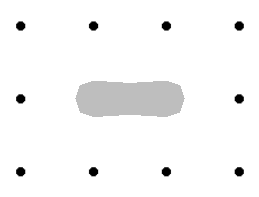
Small net.
- A 2x1 tile net connects all signals on either its left or right side.
- Game will lag a lot if you connect multiple things to the same net.
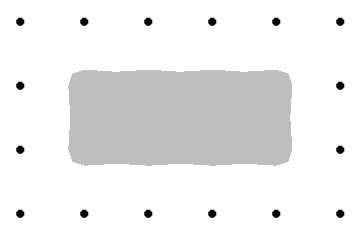
Big net.
- A 4x2 tile net that connects all signals on any of its 8 tiles.
- Aside from size, same as Small net
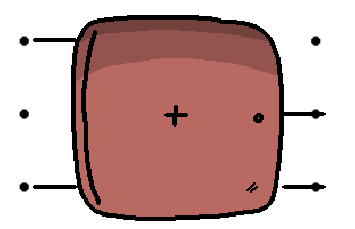
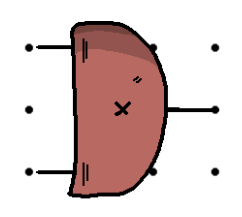
Mixer.
- A large surface component with 2 inputs and 2 outputs.
- The middle output is the sum of the 2 input signals.
- Lower output is 1 if the signals sum to more than 1 and -1 if the signals sum to less than 1. If the lower output is 1 or -1, the middle output will clip to the same value.
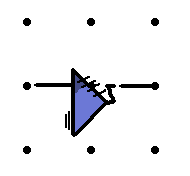
Inverter.
- Multiplies a signal by -1.
- Adding a signal with its inverted signal will result in 0 always.

Gain.
- Measures the strength of a signal, outputting between 0 (silent) and 1 (maximum loudness)
- Loudness is based on how loud a signal sounds, as opposed to anything immediately obvious about the signal itself
- For nerds: this RMS Loudness algorithm uses the fourth root of a rolling RMS to achieve a nice 0-1 value without having to convert to decibels first, then do a bunch of manipulations to get that back into a regular signal range. The effect is that the gain component can take in and put out signal which can still be used in a circuit.
Have fun!
Making the simulator engine was a lot of work, so the demo is pretty bare-bones. If you have some background in audio processing, beating the demo should take 5-10 minutes (depending on how good you are with puzzle games).
I was surprised, since I had been playtesting the same levels for so long, at how long it took to beat some of them. Including the tutorial, there are only 3 levels in the game, but the difficulty ramps up fast, so stay on your toes.
Future development plans
No! I'm tired and hungry.
Maybe if I get a job :)
You can see my horrific custom audio engine at https://github.com/Roboticy3/flex_logic_cpp_2
Known bugs
Sometimes circuit playback doesn't stop/start when expected. If audio suddenly cuts out or you are stuck, try either disconnecting, then reconnecting all outputs, or returning to the main menu, then going back to the problematic level. This mostly happens on the bottom left ruin.
Credits
Pablo Ibarz (me) - Programming, Art, Composition, Piano
Eugenio Ibarz (dad) - Bass
Dr. Benjamin Whiting and Dr. Yifan Sun - Mentoring
The Crim Del Sax Quartet - Saxophone
Special thanks to the Godot Game Engine developer community, whose previous work made it possible to do what I did with the audio engine, not to mention the rest of the engine. Other software used: Aseprite, Blender, Ableton and Pro Tools.
This project represents about 9 months of work alongside another project I'm uploading soon. Don't make two games at the same time! The main thing to work on with future projects is having stronger software architecture design from the start, which could have avoided a lot of setbacks in the development here. I also know how threads work now, which is cool.
Download
Leave a comment
Log in with itch.io to leave a comment.